

Tips
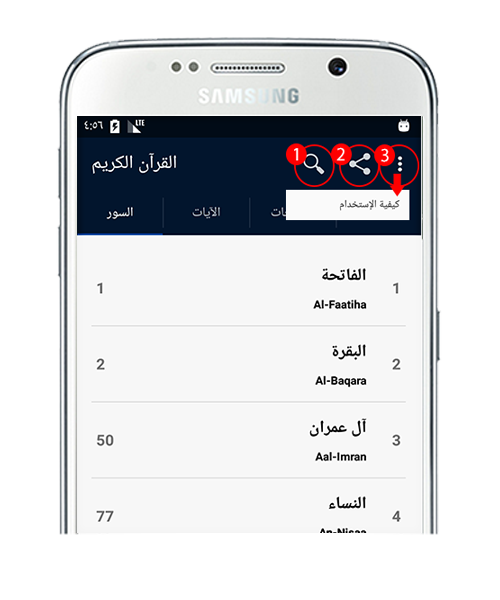
- You can share the app through the share button under the "Options" menu.
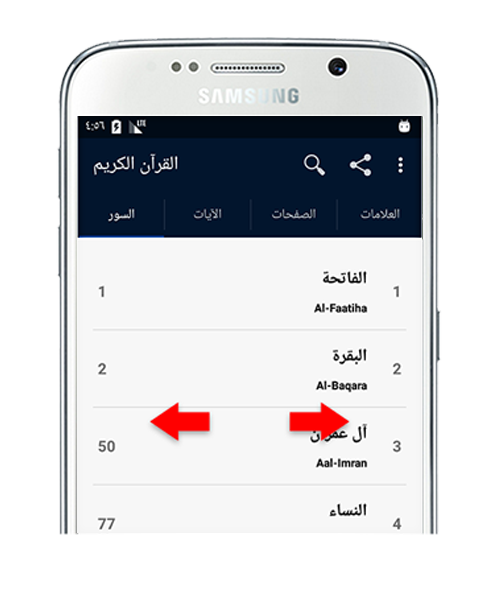
- To browse pages, slide the edge of the screen from left to right.
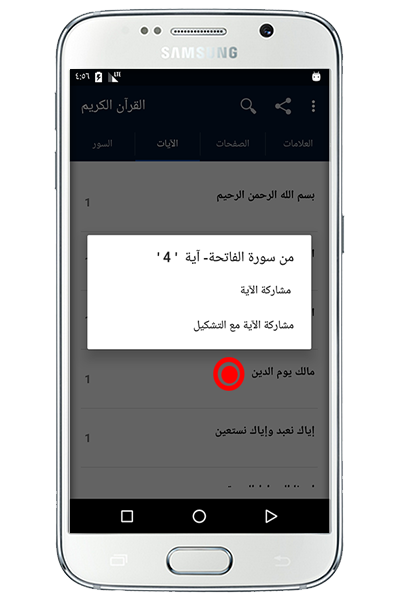
- To share any verse, keep holding on it until you see a message to share.
Features
- The whole Quran and sorted by suras.
- Search by Sura's name or part of any verse (Ayah).
- You can search by page number as well.
- All pages are attached.
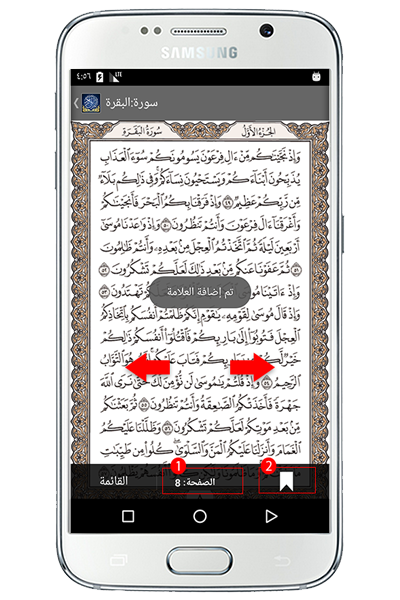
- Favorite any page so you can get back to it easier and faster.
تحويل بين الصفحات والسور والآيات
يمكن التحريك من اليمين إلى اليسار
لتغير بين السور والصفحات والآيات
Can be stirring from right to left
To change between
ALSura,pages and Al Aya
الوجهة الرئيسية
1- يمكنك تغير الصفحة.
2- يمكنك وضع علامة.
1. You can change the page.
2. You can be marked.
القائمة
1- بحث سريع حسب اسم السورة او الآية او رقم الصفحة.
2- نشر التطبيق.
3- إظهار هذي القائمة مره اخر.
1- Fast search by name sura or verse, or page number.
2-share the application.
3-Show How to use .